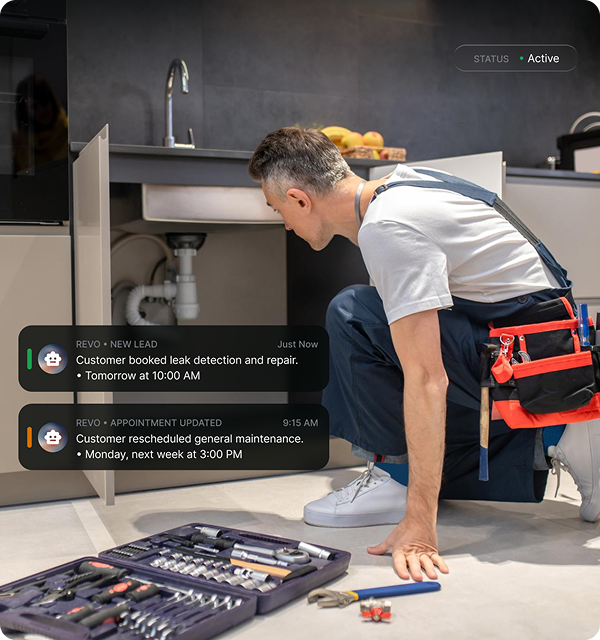
Built for the Modern Service Pro

Smart Communication for HVAC Professionals

Customers reach you differently now — your business should too. Revo modernizes communication with an AI receptionist that answers calls, captures leads, and operates 24/7. No setup or learning curve — just smarter conversations for growth.

Download for iPhone
What We Do

Instant Call Handling for HVAC Professionals

Revo's intelligent voice system answers calls instantly, understands intent, and manages conversations with precision. Every incoming call is an opportunity to capture leads, schedule appointments, and deliver exceptional customer service—even when you're on another job or after hours.

  • Instant call response – Never miss a potential job opportunity.
  • Smart spam filtering – Focus only on real customers ready to book.
  • 24/7 availability – Capture leads around the clock, day or night.
Hear a Sample
HVAC professional
Adaptive AI Learning
How It Works

Adaptive AI Learning

Revo gets smarter with every call.

Our system continuously learns from real interactions — adapting to your business tone, language, and caller behavior — so conversations feel more natural, accurate, and aligned with your brand every day.

  • Learns common client requests and FAQs
  • Improves tone and accuracy over time
  • Reduces the need for manual updates
Hear a Sample
Real-Time Insights

Instant Mobile Alerts & Summaries

Stay in control — even on the go.

Revo sends smart summaries after every call, directly to your phone or dashboard, highlighting customer intent, urgency, and next steps.

  • Prioritize urgent opportunities instantly
  • Receive call highlights and transcripts in seconds
  • Manage your team faster and smarter
Hear a Sample
Mobile alerts

Multi-Platform Sync

Stay organized effortlessly.

Revo connects with your job management and CRM tools — keeping every lead, message, and appointment synced in real time. No more missed updates or double entries.

Emergency Prioritization

Never miss an urgent job again.

Revo detects emergency requests, filters spam, and alerts you instantly so you can prioritize clients who need immediate help — day or night.

Business management interface

Follow-Up Automation

Turn every call into a lasting connection.

Revo automatically follows up with potential clients, confirms job details, and sends updates — helping you close more deals and maintain great customer relationships.

AI Job Estimator

Convert phone inquiries into bookable jobs. Revo collects essential details from each caller—service type, location, urgency, and availability—then produces a pre-qualified estimate based on your pricing rules.

Download for iPhone

Elevate Your HVAC Communication Today

Capture Every Opportunity

Capture Every Opportunity

Never miss a call or request. Revo's AI answers customers, collects service details, and sends you the info to act fast.

Automate Without Losing the Human Touch

Automate Without Losing the Human Touch

Sound personal, even off the line. Customize Revo's tone to fit your brand—friendly, calm, or professional.

Stay in Control, Anywhere You Go

Stay in Control, Anywhere You Go

Get notifications for urgent requests, track messages, and view call summaries from your phone. Revo keeps your business organized.

Instant Email & SMS Follow-Ups

Instant Email & SMS Follow-Ups

Stay connected after the call. Revo sends Email and SMS follow-ups with call details and new lead information, so you never miss a chance to respond.

Download for iPhone
Decoration element
Impact

Measuring the Revo Advantage in HVAC Businesses

Our AI-driven communication system empowers HVAC professionals to secure additional jobs, expedite responses, and enhance the overall customer experience—round the clock. Proven outcomes demonstrate how Revo transforms routine operations into sustainable growth.

94%

Faster response time to customer inquiries

63%

Increase in booked jobs from inbound calls

78%

Improved customer satisfaction and repeat business

Hear a Sample

What Our ClientsAre
Saying

Hear from business owners who've modernized the way they connect with customers using Revo.

5 stars

During peak summer season, our phones never stop ringing. Revo handles the overflow beautifully — it schedules maintenance appointments, prioritizes emergency AC calls, and collects all the details we need. Customers can't tell it's AI.

Jessica Lee

Jessica Lee

Operations Manager, Cool Air Solutions

5 stars

The system understands HVAC terminology really well — it asks about unit types, symptoms, and urgency levels just like our best dispatchers. We've seen a 40% increase in booked appointments since implementing Revo.

Carlos Mendoza

Carlos Mendoza

Owner, Precision Climate Control

5 stars

Revo's been solid for routine calls and scheduling. For complex diagnostic questions, we still prefer direct contact, but it handles 80% of our inquiries perfectly. The mobile alerts keep us informed even when we're on service calls.

Daniel Reyes

Daniel Reyes

Owner, Reyes Emergency HVAC

FAQs

Common questions about Revo's AI virtual receptionist service

How does Revo work?

Our AI uses advanced natural language processing to understand and route calls. It learns from each interaction, becoming more precise over time.

Is my data secure?

We use bank-level encryption and follow strict data protection protocols. Your business information remains completely confidential.

What industries do you serve?

Revo supports businesses across healthcare, legal, real estate, technology, and many other professional sectors.

Can I customize the AI?

Yes. Our platform allows detailed customization to match your brand voice and specific communication needs.

What are the pricing options?

We offer flexible plans starting from small business to enterprise solutions. Pricing scales with your specific requirements.

Call workflow

HVAC answering service with appointment scheduling

An HVAC appointment request needs a work category before it needs a time slot. Revo can collect whether the caller wants routine maintenance, a new service visit or a change to an existing appointment while your team is occupied. Keep this operating-hours scheduling conversation separate from closed-office on-call coverage and from overflow routing.

Identify the system involved, the service requested and whether the person is a new or existing customer. Record an existing appointment reference before collecting a change request. Ask for the preferred visit period, then use only the scheduling process the business has actually configured; a customer preference is not an accepted booking.

Booking and team transfers depend on the selected plan and supported configuration. A requested time is not a confirmed appointment. Apply your business’s actual hours, approved contacts and fallback rules.

The HVAC professional decides technical urgency, diagnosis and the work needed. Do not recommend a repair, promise a technician arrival or treat an appointment-change request as already approved.

Information to collect

  • Name and reliable callback number
  • Service address and service-area fit
  • Heating/cooling system as already known
  • Maintenance, service or appointment-change request
  • Existing appointment reference when applicable
  • Preferred visit period and responsible follow-up contact

When is an HVAC appointment actually confirmed?

Only when the supported booking process and the business’s real availability confirm it. Capturing a time preference or a service request alone does not reserve a visit.

Related guidance: Appointment booking HVAC after hours HVAC overflow

Current product scope: Revo answering workflow and plans and configuration.

Illustrative operating scenarios · Updated · Published by Revo

HVAC calls: three requests, three next steps.

These are proposed script tests, not customer recordings, testimonials or measured results. Use your actual hours, service area and approved contacts.

Routine cooling request

A caller wants a maintenance visit next week. Collect the known system type, service ZIP, callback number and preferred period.

Next step: Use the configured booking process or send the request for office review. A preference alone does not reserve a slot.

An existing appointment changes

A caller wants to move tomorrow’s visit. Collect the booking reference, current appointment and requested change.

Next step: Keep the original appointment until the office or supported scheduling workflow confirms the change.

The on-call contact is unavailable

A caller reports urgency outside office hours and the approved contact does not answer. Record the caller’s own description and callback details.

Next step: Use the business’s approved fallback and actual service hours. Intake does not diagnose the equipment or establish dispatch.

Review before routing customer calls

  • Test callback details, service-area fit and the request category.
  • Confirm which system receives the request and who owns follow-up.
  • Test an unavailable contact and the next step the caller hears.
  • Check the current plan: team transfers and field-service connections are excluded from Solo.

Published scope: Revo plans and inclusions. Booking and handoff depend on the selected plan and supported setup.